
Using Filter Forge
There are many FREE things available on the Internet. This includes Filters. For this session I have chosen Filter Forge since this provides a wonderful range of filters that can be controlled with sliders. Colours too are variable.
Now Filter Forge have also got many other filters for which they charge but here we will concentrate on the free types. There are plenty enough here for you to make some excellent images.
1. The first thing to do is to download the filters sets from http://www.filterforge.com/download/
2. Scroll down to the Free Photoshop Plugins section.
3. Choose the download file for your operating system as you can tell from the icons shown here.

4. Currently there are six packs. Download all of them.
5. Find where they have been stored on your computer. This could be in the Downloads folder.
6. You could now move them into a Filter folder if you wish.
7. Each of the Packs is a program that needs to be run. Ensure that you do not have any Photoshop version open before clicking on each pack in turn.
8. Cleverly this allows you to load these filters into any or all versions of Photoshop that you may have loaded and it will do it all for you. Just sit back and relax for a moment.
9. Open Photoshop and a photograph within this. Make sure that the image size does not exceed 3000 pixels.
10. Click on Filter on the main options bar. In the drop box you will now see Filter Forge at the bottom.
11. Now you have a choice of which filter pack to use. They all have the same characteristics.
12. Click on one option and you get this box.  Click Continue.
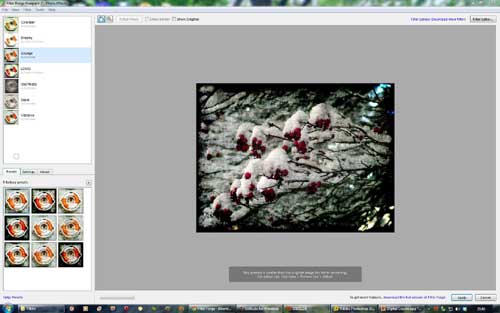
13. The filter opens as a full screen with styles top left and pre-sets for these bottom left. Note the Settings tab. This gives access to sliders to vary the effect of the filter.
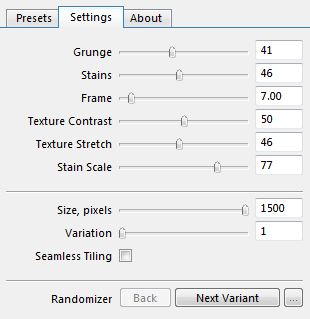
14. The settings box is shown here. Just play with these until you like what you see.
15. Click Apply to finish.
16. On the Filter Forge web site you can see what the paid for filters can do with examples of finished works. Some of these are really beautiful or spectacular.
17. There are also some Tutorials that will show you how to use these filters. Look at the use of Old Photo on http://www.filterforge.com/more/tutorials/tut-002.html for instance.
18. There is a watercolour painting from a photograph done using Filter Forge and this can be seen here http://www.filterforge.com/gallery/7.html
19. It is fun like Fotosketcher. I hope you enjoy this suggestion.