
Stepping Out of the Frame
This is a technique we have shown before but it has not been written down. The idea is to create the effect of a part of your image popping outside the frame. A bit like the example here of the man looking at a photograph in Bath.
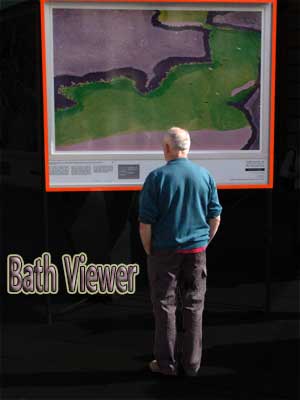
Here is how to do this easily and quickly.
1. Open a suitable photograph and Duplicate it. Close the original. Check that you have made all the corrections you need.
2. Duplicate the Background Layer
3. Using the Rectangular Marquee [or the Polygonal Lasso] make a selection inside the image so that you miss out the parts you want outside the frame.
4. To make a frame we use the Stroke method as follows. Go to Edit > Stroke and insert a width of about 12 to 20 pixels. Click on the Colour sample to choose a frame colour. I suggest a dark colour. Tick the Inside Location. Click OK.
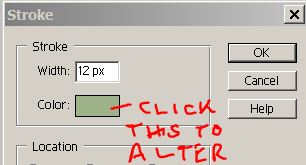
5. Invert the Selection. We now fill the outside area with a new background solid colour. Do this by tapping on the Foreground Colour and picking a shade. Here I suggest a lighter shade than the frame colour.
6. Now go to Edit > Fill. Make sure you choose the Foreground Colour. Click OK. This should fill the outside. The shortcut here is to use Alt + Backspace key.
7. Reduce the top Layer Opacity to about 50% so that the image can be seen and the frame is visible too. Deselect.
8. Use the Selection Brush and paint over the parts you want outside the frame. Any errors using this can be corrected by pressing the Alt key and painting over the error. In proper PS you would use the Quick Mask in the same way.
9. Having carefully made the selection all you need to do is press Ctrl + x to cut the pixels from the top layer.
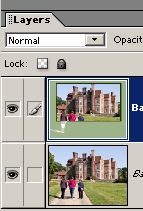
10. Return the Layer Opacity back to 100% to reveal the final result.
11. Here on the below is another example that is partially done. You can just see the other figures in ghostly form waiting for the selection treatment.

12. In this photo the frame could have cut through the tops of the chimneys and then revealed outside the frame.
13. There is no reason why the frame has to be rectangular. In fact why not give it a perspective view as if looking through a window at an angle.
14. Have a go on a few images until you find the best types for this technique.