
Lillipution Photography
This idea turns a real world photograph into one of a miniature world. Just as if you had a Tilt and Shift lens.
It can look quite dramatic and exciting as seen here with this scene of Staithes.
Notice that this is a view from slightly above the village.
You can see that this looks like a model of Staithes rather than a real view [at least I hope so].
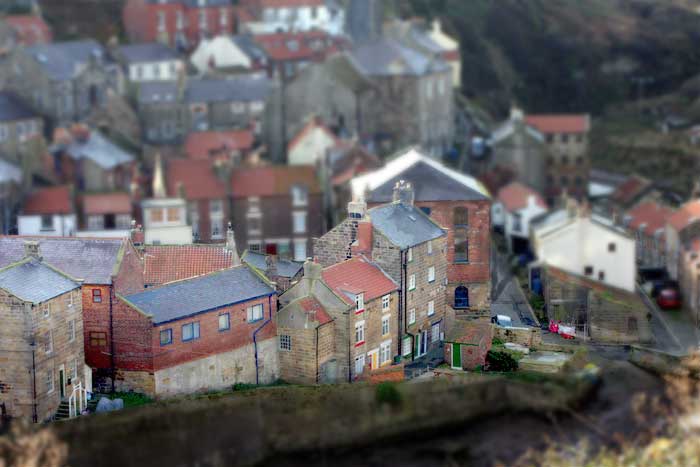
How do we go about doing this?
1. Open a suitable photograph in PSE and make any corrections for brightness, contrast, cropping and colour.
2. Duplicate the background layer.
3. Select the background layer and by
clicking on the
adjustment layer icon  and picking, say, Levels.
4. Click OK on this. That is no adjustments. This is just to get a layer mask. Your Layer stack should look like that on the below.
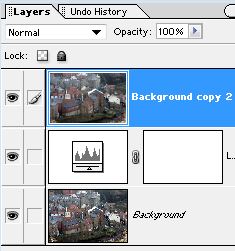
5. With the top layer highlighted type Ctrl+G to clip the top layer.
6. Now select the Layer Mask.
7. From the Tool Box pick the Gradient Tool.
8. Ensure that Fore to Transparent mode and Reflection mode are chosen with Foreground black. See below.
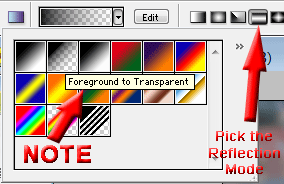
9. With this Gradient Tool setting drag it upwards [the effect is assymetrical] over the main part of your photo.
10. You should now see a black stripe over the mask but no other effect yet.
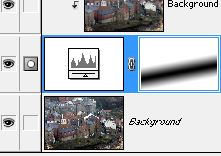
11. Select the top layer and from the Filter menu choose Blur > Gaussian Blur.
12. Set this to around 10 pixels.
13. You now get part of your image blurred and the rest still sharp. Hopefully in the areas you wish.
14. By selecting the Mask and a Brush you can adjust where it is sharp or blurred using black to make sharper and white to blur more. Remember to reduce the Brush Opacity using the number keys. That is use 1 for 10% and 2 for 20% and so on.
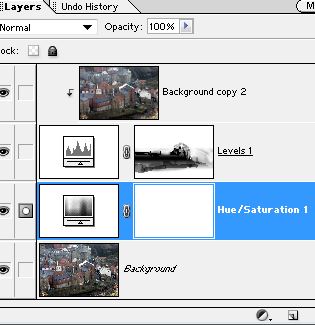
15. Two further enhancements can be made if needed. A) Increase Saturation and B) Increase Sharpness.
16. Using Hue & Saturation move the centre Saturation slider to say 30%. Adjust to taste. The idea here is to overdo this slightly in order to better simulate a model.
17. Similarly for Sharpness. Using the Unsharp Mask set this to say 250% to bring out textures.
18. The hardest part about this method is to find a suitable starting image. It might be best to go out and take photos specifically for this purpose.
19. Best of luck.