
This idea again came from Photo Radar to which Many Thanks for the fun generated.
The idea is to convert a full colour image to just two tones namely Black and White with no intermediate tones. Having done this you can then use your imagination and skills from previous lessons to take this concept much further. By this we mean using Blend modes; using other Adjustment Layers; selecting only significant regions of the original photograph for the treatment and then filling the rest with solid colour or a pattern or another photo and so on.
To begin:
1. Find and open a suitable image. Those that work best are simple images. Buildings are a good topic to try.
2. Make a Duplicate copy by going to Image > Duplicate Image. Click OK. Adjust colour and contrast now.
3. Duplicate the background layer by going to Layer > Duplicate layer.
4. Select the Adjustment Layer of Threshold from the black & white icon at the foot of the layers palette.
5. Immediately you convert your image to just black and white as shown below. 128 is the start condition.

6. Now click and drag the triangle in the centre and move left or right to change the proportion of black to white. Going to the left will decrease the black content. Below you can see the effect at a setting of 69. Even so the right hand stone is still totally black with no detail.
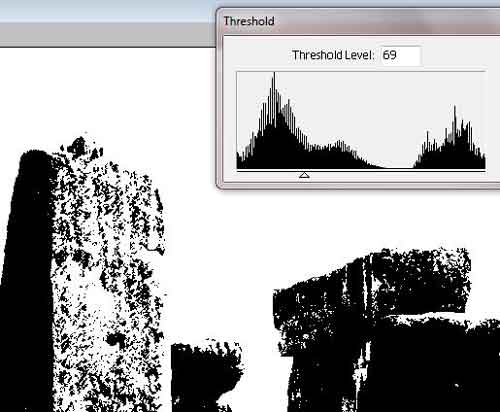
7. A way round the problem that is outlined above is to make a second duplicate layer and then use another Threshold Adjustment layer. Now move the triangle further to lighten other areas. Having done this combine these two layers to get the best of both worlds.
8. To do this highlight the lowest threshold adjustment layer and then from the Adjustment layer select Levels. Click OK.
9. Now highlight the top original image layer as below.
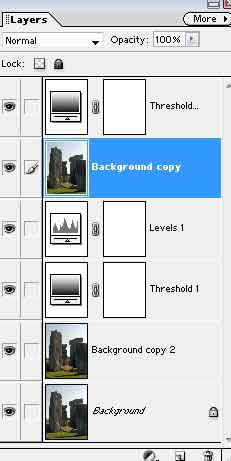
10. Now go to the Layer menu and choose Group with Previous.
11. Select the mask of the Levels layer and then pick a Square brush.
12. You can now paint on the white mask with black to reveal parts of the lower version.
13. Paint until happy with the result. You should have six layers. Have you?
14. If you paint on the top threshold layer mask then you will bring through the original colour.